I redesigned my own WordPress site with Grok Bot. Here’s what actually happened.
I build websites and automation for New Jersey small businesses. This time I was the client.
I connected an AI desktop assistant to my own WordPress site and used it to restyle pages, fix mobile layouts, and clean up the footer. Here’s how it went: what worked, and what I’d do differently.
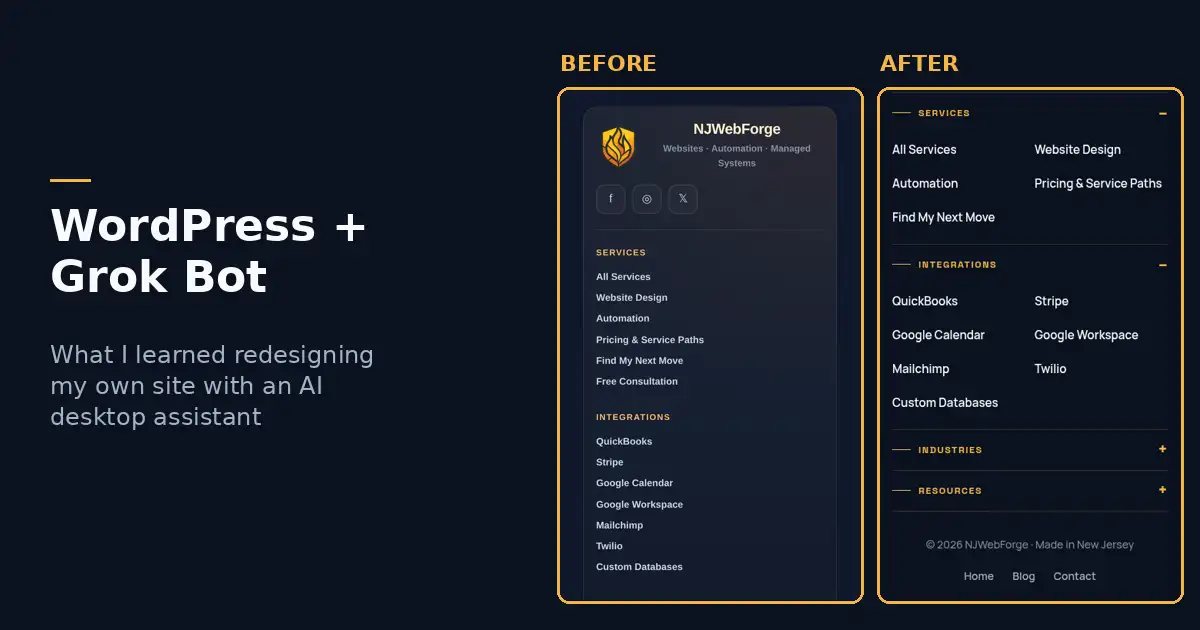
My mobile footer, before and after
How Grok Bot talks to WordPress
Grok Bot connects to my site through the Royal MCP plugin. That gives it a controlled set of WordPress tools: read a page, update a page, edit a widget, set a featured image, upload media, and so on.
I talk to it in plain English, from my desktop or my phone. It reads the live page, drafts the change, shows me a preview, and only makes it live when I say “push it.”
The work, in plain terms
One design system
Client Portal, Shield, Automation, Industries, and all six industry pages now share the same fonts, navy and gold colors, buttons, and spacing as my homepage.
Swipeable mobile cards
Long card stacks became swipe rows on phones, with a small “swipe to see all” hint, and a normal grid on desktop.
Pixel-level alignment
The hero image now sits flush under the menu bar, and widths and margins match across pages. It measured them at phone and desktop sizes instead of eyeballing.
Better wording
On my Photography page, the workflow steps now read the way a photographer works: inquiry and consult, contract and retainer, session prep, editing and gallery delivery.
Small fixes, fast
It swapped the featured image on my Byram Transmission case study, and it fixed the Find My Solution pop-up so “Answer the guided questions” goes straight to question one.
A mobile footer redesign
Tiny, cramped links became tap-to-open groups with bigger tap targets, the main buttons moved up top, and there’s now room for the sticky call bar.
Preview first. Then “push it.”
My working rules
Every change- Drafts and previews before anything goes live. I saw phone and desktop screenshots first.
- Backups every time. It saved the page’s previous version before each edit, and most edits returned an undo token.
- My rules, written once. No gradient headline text, keep the NJ imagery, don’t invent stats, no breadcrumbs, and leave the footer alone unless I say so.
What worked, and what didn’t
What worked
Pros- Six industry pages restyled in one pass, with every image kept
- It measured alignment instead of guessing
- Rewording that kept the meaning but fit how my clients talk
- Easy rollback when something wasn’t right
The hiccups
Cons- Some actions paused for a safety check and needed my approval
- My site sometimes refused connections from the assistant’s computer, so it had to check its work another way
- Theme CSS fought back a couple of times, and a fix took a second try
- A vague request got a vague first draft
If you try this on your site
Always preview
Ask for phone screenshots, not just a description.
Be specific
“The picture isn’t touching the menu bar” got a better fix than “it looks off.”
Check it on your own phone
Screenshots are good. Your thumb is better.
Keep backups and undo. Make it a rule before any live change. And set your brand rules up front: it follows them much better when they’re written down.
Quick answers
Can an AI assistant edit a WordPress site directly?
Yes, if you give it access. I connected Grok Bot to my site with the Royal MCP plugin, which lets it read and update pages, widgets, and media.
Is it safe to let AI change a live website?
It depends on how you work. I use previews first, a backup before every edit, and undo, and nothing goes live until I say so.
Does it replace a web designer?
Not for me. It made me faster, but I still decided the design, the wording, and what goes live.
Can NJWebForge help me set up something like this?
Reach out and tell us how your site and business run today. We’ll talk through whether it fits.
Want your site to work this smoothly? Start with the bottleneck.
Answer a few guided questions, or talk it through with me directly.